
How To: Play YouTube Videos
in Background of iPhone [VIDEO]
I get it, you want to play youtube videos and do other things on your iPhone.
Ever time you start a youtube music video and try to do something else, it stops playing. Very annoying.
This is how to play youtube videos in the background while you multitask on your iPhone.
(requires iOS4+ .. if you have an iPhone 4, this will work… if you keep your 3G or 3GS updated with apple’s latest software, this will work… OTHERWISE: sorry)
Learn more about iOS4 features here.
How To: Play a YouTube Video in the Background of iPhones
Here is a step by step guide to playing a youtube video while doing other things on your iPhone.
The youtube video will play in the background much like the iPod app or Pandora app plays in the background while you text, use the maps, check out your calendar or the weather.
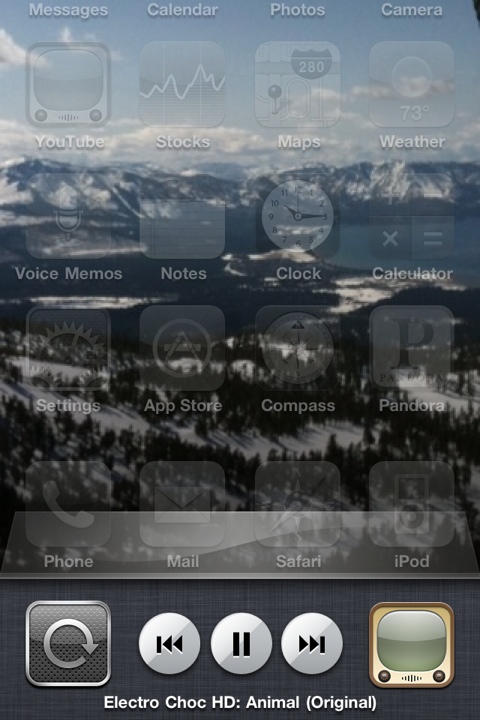
- Open the youtube app & find your favorite video
- Let the video load to the point where it starts playing
- Press the home button
- Double click the home button to bring up multitasking
- Swipe to the right to find the media buttons (rewind/play/pause/forward)
- Press the play button
- MULTITASK! – go text, map, whatever your heart desires!
That’s it!
Yet Another Way To Multitask YouTube Music Videos!
Alternatively, you can:
Start playing a youtube music video (like steps 1-2 above)
Press the home button
Lock the iPhone
Click the home button once to show your background – then double click the home button to bring up the media controls on the locked screen
Press play – since the last piece of audio you played was the youtube video, that will start playing
Unlock your iPhone and MULTITASK – since you locked your iPhone from the home screen, you return to the home screen with the youtube video playing in the background and you’re free to do whatever you want!
That’s all there is to it – play youtube in the background on your iPhone by following those easy steps above!
Hey, did you know your can play snake on youtube videos?
If this helped you – let me know in the comment box below!


about 2 years ago
Just got my iPhone, this works great thanks. Actually I’m doing it right now
about 2 years ago
good stuff Nathan, glad you found this helpful.
about 1 year ago
Guess what – it only works on YouTube,
How about videos in your phone?
I found a semi auto way – it seems like apple is all out to get us on this one, it stops the video at every turn.
You can run 1 music video in the background without multitasking though. At least it’s in the background, so u can enjoy 3 minutes of bliss with ur phone in the pocket. Not sure why apple took it out for 4.3 and after…
Here’s how to do it –
1 Run ur video
2 double click home to bring up panel (pauses video)
3 swipe panel to show media control
4 play video via those controls
5 press lock button to turn off iPhone screen
Voila – plays 1 mv in the background. Eat that apple.
about 1 year ago
Absolutely AWESOME! Well done Jas… thanks for sharing!
about 1 year ago
Each time I want to use this method, it goes to my iPod instead. I delete the iPod icon from the multitask panel thing but it still plays from my iPod.
about 1 year ago
Thx, this helps a lot ..cheers.
about 1 year ago
This is of limited use. For example it doesn’t seem to allow you to load up a video (buffer it, effectively) in the background. Iow, you can’t click out of YouTube switch to multitask iPod control, press play and buffer the rest of the video (in case if slow net connection), then come back to it. If you leave it playing but mute the sound, once it gets to the end of the video, YouTube forces you to load it again.
about 1 year ago
thank u so much it works really good make more video do u know how to jail break a iphone 3gs
about 1 year ago
Thank you! This is wonderful! There’s yet a third way when you’re using headphones with a play/pause button, or at least I know it works with the stock buds. Pay attention cuz it’s real complicated:
1. Let the video start playing and hit the lock or home button once.
2. PRESS THE PLAY BUTTON ON THE HEADPHONES!
about 1 year ago
I had been wanting to know how to do this. Thank you for posting.
about 11 months ago
Yup!
about 1 year ago
The instructions worked for me and your post made it easy to get the solution. Thank You
about 11 months ago
Glad to hear it
about 7 months ago
I have an iPhone 5 and this doesn’t work for me anymore. I used to use this method so much on my iPhone 3G, and now I miss it. Is it just my phone?
about 7 months ago
You know what, I don’t know.. I still have the 4 — how does the multitasking work with the iPhone 5? Are the icons still at the bottom? Can you still scroll everything right to get to the music.